Tor Browser in 2026: How It Works, How to Use It Safely, and What It Can't Hide
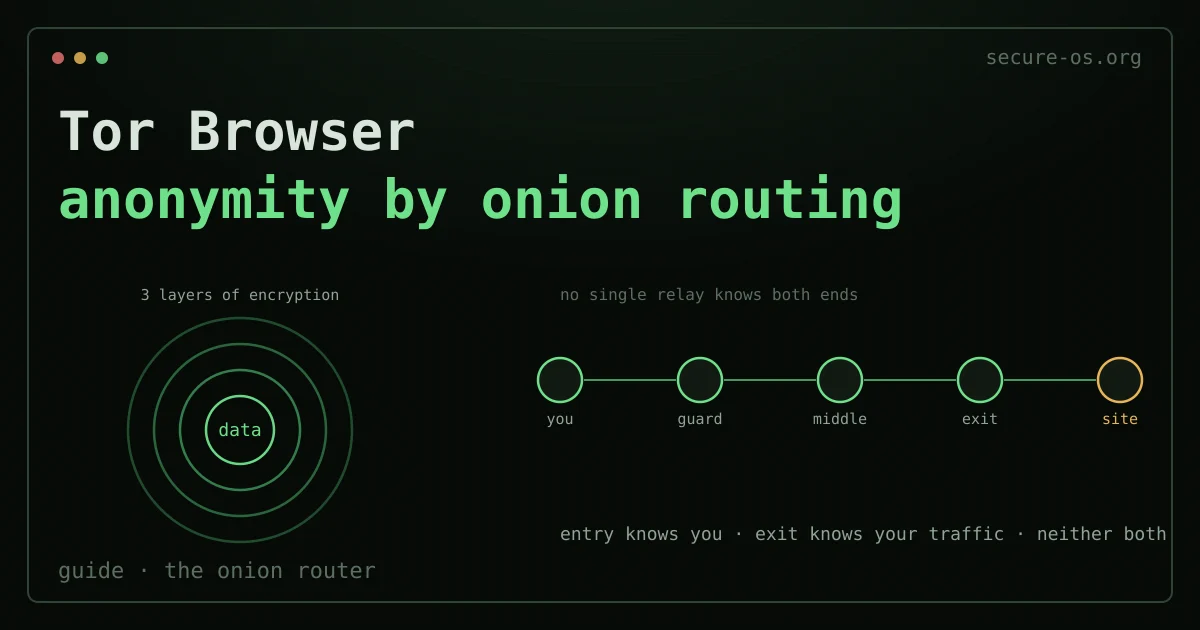
Tor Browser is the single most accessible anonymity tool ever shipped: download one program, open it, and your traffic leaves your machine wrapped in three layers of encryption, bounced through three independent relays before it ever touches the open internet. No configuration, no subscription, no account. If the three-relay mechanism itself is new to you, what Tor is covers it first. That accessibility is also its trap - most people who get deanonymized while using Tor do so not because the network failed, but because they used the browser like a normal one.
This guide explains what Tor Browser actually protects, how onion routing works under the hood, how to install and verify it without trusting a random mirror, and the specific habits that quietly undo it. It is written the way this site writes everything: by threat model, not by marketing.
What Tor Browser is - and what it is built on
Tor Browser is a hardened build of Firefox Extended Support Release, pre-configured to route every connection through the Tor network and stripped of the features that leak identity. It bundles the Tor client, a fingerprinting-resistant browser profile, and sane defaults (NoScript, HTTPS-first, no persistent cookies) into one package maintained by the Tor Project.
The key word is hardened. A normal Firefox sent through a proxy still leaks: canvas fingerprints, screen resolution, font lists, WebGL, timezone. Tor Browser standardizes all of these so that, ideally, every Tor Browser user looks identical to every other. That uniformity - not just the relays - is what makes you anonymous. (Other hardened browsers fight fingerprinting without the Tor network - see our best private browser comparison.)
What an amnesic system does not erase
Leaving no trace on the machine is one thing. The accounts you sign into during that session are another: they remember, and they are reachable from anywhere with the same password. An amnesic system protects the device, not the identity you use from it.
Situate your own attack surface, 10 questions, about three minutes, no account, no email, nothing stored. The result names what actually exposes you, which is often on the account side rather than the machine side.
How onion routing works
When you request a page, Tor Browser builds a circuit of three relays chosen from thousands run by volunteers worldwide:
- The guard (entry) relay sees your real IP address, but not what you’re requesting - the data is still encrypted in two more layers.
- The middle relay sees neither your IP nor your destination - only that traffic passes from one relay to another.
- The exit relay decrypts the final layer and forwards your request to the destination site. It sees the traffic, but not who you are.
No single relay knows both who you are and what you’re doing. Your client wraps the request in three layers of encryption (the “onion”), and each relay peels exactly one. The destination site sees the exit relay’s IP, not yours. Circuits rotate roughly every ten minutes, and a new circuit is built per site, so different tabs don’t share an identity.
This is also the model’s limit: the exit relay can read unencrypted traffic. HTTPS protects the contents end-to-end, which is why Tor Browser forces HTTPS wherever possible - but a hostile exit node can still see which sites you visit over plain HTTP and tamper with them. Use HTTPS, always.
Installing and verifying it (the step most people skip)
Download Tor Browser only from the official source: https://www.torproject.org/download/. In censored regions where that domain is blocked, use the official GetTor mirrors (email gettor@torproject.org) rather than a random “tor download” search result - fake, trojaned Tor builds are a real and recurring attack.
Then verify the signature. The Tor Project signs every release; verifying proves the file you downloaded is the file they built, not one a mirror swapped:
# Import the Tor Browser Developers signing key
gpg --auto-key-locate nodefault,wkd --locate-keys torbrowser@torproject.org

# Verify the download against its .asc signature
gpg --verify tor-browser-linux-x86_64-14.x.tar.xz.asc \
             tor-browser-linux-x86_64-14.x.tar.xz
A “Good signature” line means it’s authentic. If verification fails, do not run the file. On a threat model where this matters at all, it matters completely.
The rules that keep Tor anonymous

The network is sound. People deanonymize themselves. The non-negotiables:
- Don’t resize the window or go fullscreen. Window dimensions are a fingerprint. Tor Browser ships at a letterboxed default size for a reason - leave it.
- Don’t install add-ons. Every extension makes you unique and can leak. The bundled NoScript is the only one you need. That is the general failure mode described in browser fingerprinting: each addition subtracts you from the crowd.
- Don’t log into accounts tied to your real identity. Checking your real email over Tor links that session to you instantly. Tor anonymizes the connection, not the account.
- Don’t open downloaded files while online. A PDF or DOC can fetch a resource directly, outside Tor, revealing your real IP. Disconnect before opening, or open in a VM.
- Set the security level deliberately. The shield icon offers Standard / Safer / Safest. “Safest” disables JavaScript entirely - the single biggest reduction in attack surface - at the cost of breaking many sites. For anything sensitive, raise it.
- Don’t torrent over Tor. BitTorrent leaks your real IP regardless of proxy settings, and it crushes the volunteer network.
Where Tor Browser stops protecting you
Tor Browser anonymizes traffic from the browser. It does nothing for the rest of your system: your OS updates, your other apps, a misbehaving background process - all of that still goes out your normal connection. If your threat model is serious, the browser alone is the wrong layer.
That’s the boundary where dedicated operating systems take over. Tails routes your entire system through Tor, runs from RAM, and forgets everything on shutdown - the right tool when you can’t trust the machine you’re on. Whonix splits your system into two VMs so that even malware that fully compromises your workstation cannot learn your real IP, because the workstation never knows it. Tor Browser is the entry point; these are the destinations when the stakes rise.
For everyday browsing where Tor is overkill, slow, or outright blocked, the pragmatic privacy layer is a different one - and it’s worth being honest about that:
The honest limitations
Tor is strong, but it is not magic, and pretending otherwise gets people hurt:
- Global passive adversaries. An attacker who can watch both the traffic entering the guard and leaving the exit can, in principle, correlate timing and volume to link them. Tor does not defend against an adversary that sees the whole network at once. For most threat models this is theoretical; for nation-state targets it is not.
- Exit-node visibility. Unencrypted traffic is readable at the exit. HTTPS is mandatory, not optional.
- Browser exploits. A JavaScript or browser vulnerability can bypass Tor entirely by making your machine connect directly. This is exactly why “Safest” mode disables JavaScript, and why high-stakes use belongs inside Whonix or Tails, where even a browser compromise can’t reach your real IP.
- You are the weakest relay. Logging in, leaking a username, matching writing style, or simply using Tor at predictable times can deanonymize you when the cryptography never will.
Tor Browser is the right first tool for anonymity, and for a large majority of people it is genuinely enough. Know precisely what it protects, follow the rules that keep it intact, and escalate to a Tor-routed operating system when your threat model - not your anxiety - demands it.
Frequently asked questions
Is Tor Browser legal and safe to use?
In most countries Tor Browser is perfectly legal and is used by journalists, researchers and privacy-conscious people every day. It is safe when downloaded from the official Tor Project site and kept updated. A few authoritarian countries restrict or block it. As with any tool, what matters legally is what you do with it, not the browser itself.
Does Tor Browser hide my IP address?
Yes. Tor Browser routes your traffic through several volunteer-run relays, so the sites you visit see a Tor exit node, not your real IP. It also standardises your browser fingerprint to make users hard to tell apart. This is what makes it the strongest mainstream tool for anonymity.
Tor Browser or a VPN - what is the difference?
A VPN routes your traffic through one provider you must trust, and is fast - good for everyday privacy and hiding your IP from sites and your ISP. Tor spreads trust across multiple relays for much stronger anonymity, but is slower and some sites block it. For maximum protection, Tor (ideally inside Tails or Whonix); for fast everyday privacy, a VPN. See is Tor safe? Tor vs a VPN for a deeper look at the trade-offs.