Qubes vs Tails vs Whonix: Which OS for Your Threat Model?
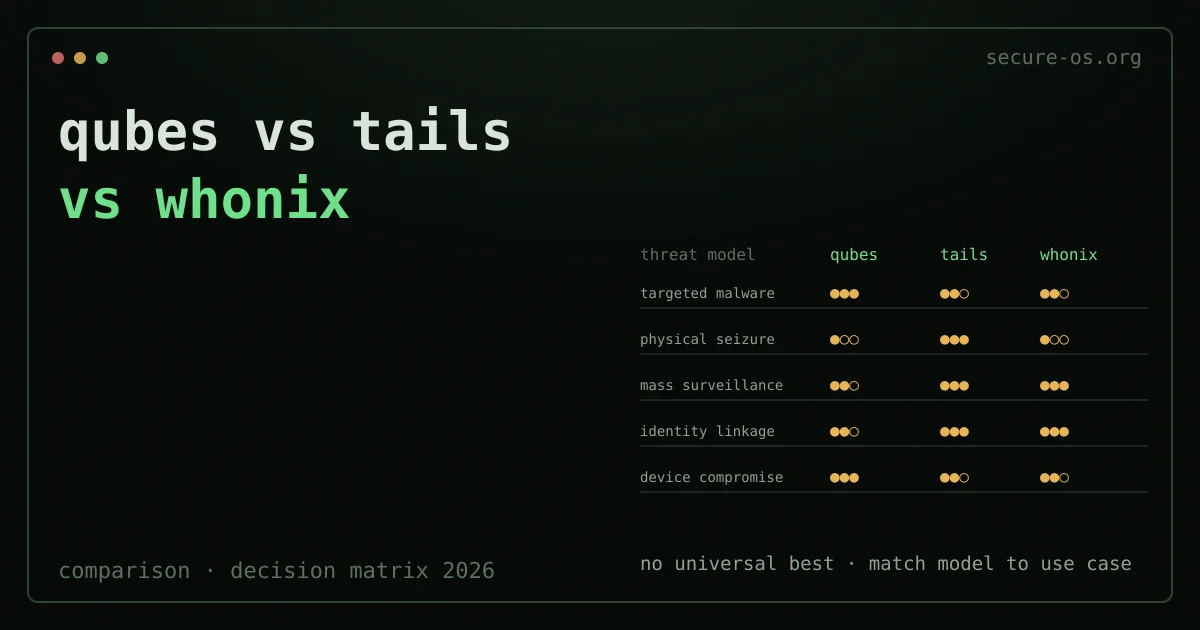
No security operating system is “best” for everyone. The three main secure desktop systems - Qubes OS, Tails, and Whonix - were each built for a specific set of threat models. Using the wrong tool for your case is as risky as using no tool at all.
This comparison uses the same approach as the original Secure Desktops mailing list (2015-2017): start with the threat model, then pick the tool. Not the reverse. All three systems grew out of or touched that community. Patrick Schleizer (Whonix) and Joanna Rutkowska (Qubes) were both active in those talks. The Tails team (sajolida and others) was there from the first meeting at a 2015 European security conference.
In a hurry? Our Which Secure OS quiz maps your threat model and use case to Qubes, Tails or Whonix in under a minute.
The Three Systems at a Glance
Qubes OS is a Xen-based hypervisor desktop. It runs all user apps in separate virtual machines (qubes). If one qube is hacked, the others stay safe. It is a daily-use system built for people who face targeted threats but still need to work all day on one machine.
Tails is a live USB system. It runs fully in RAM and sends all traffic through Tor. By default, it forgets everything between sessions. It is built for short, sensitive tasks where amnesia and anonymity matter more than saved data.
Whonix is a pair of virtual machines. The Gateway is a Tor-only network stack. The Workstation has no real IP access. Both run inside a host system. It joins Tor isolation with saved work, and it runs on top of your current Linux, Windows or macOS install.
Decision Matrix
This matrix rates how well each system handles five common threat model types. The scale has three points: strong protection (●●●), partial protection (●●○), or limited protection (●○○).
| Threat | Qubes | Tails | Whonix |
|---|---|---|---|
| Targeted malware / exploit | ●●● | ●●○ | ●●○ |
| Physical seizure of device | ●○○ | ●●● | ●○○ |
| Mass surveillance / traffic analysis | ●●○ | ●●● | ●●● |
| Identity linkage / deanonymization | ●●○ | ●●● | ●●● |
| Compromise of host OS | ●●● | N/A | ●○○ |
Reading the table: no system scores ●●● on every row. That is the point. Choose based on the row that fits your case best.
Threat 1: Targeted Malware and Exploit Delivery
Best choice: Qubes OS
Say a skilled attacker is going after your machine. They might use spear-phishing, zero-day browser exploits, or harmful documents. Here, splitting work into qubes is the right design. If your email VM is hacked, your document VM stays safe. A hacked browser cannot reach your wallet qube. The hypervisor layer makes this a built-in promise, not just a rule.
Tails gives some protection here. Its Tor Browser runs in a locked-down space, and the attack surface is smaller. But Tails is not built to hold back an attacker once they break in. If someone exploits Tails, the session is hacked. The amnesic design means the breach does not carry over to the next session. That is real protection, but it works in a different way than qube isolation.
Whonix isolates the network but does not split work app by app. An exploit in the Whonix Workstation can reach all files and tasks inside that VM.
Threat 2: Physical Seizure of the Device

Best choice: Tails
Say a device is seized - at a border, by police, or by theft. Tails gives the strongest default protection, because there is nothing on the device to take. The USB drive holds only the encrypted Persistent Storage (if you set it up) and the Tails OS itself. Session data sits in RAM and is gone once you power off.
Qubes OS stores all qubes on the host disk. Full-disk encryption guards the contents at rest, but the encrypted volume still exists. An attacker can read the data with the passphrase (forced out of you) or with the header exposed by a cold boot attack.
Whonix runs inside a host system. The host disk holds the VM images of both the Gateway and Workstation, plus all the files you made in those VMs. The key defense here is host-disk encryption. But Whonix does not do that by default - it leans on how the host OS is set up.
If your threat model is forced decryption (a court order or border official making you unlock your device), the amnesic design of Tails means there is nothing to unlock. The encrypted Persistent Storage exists. But a good cover story, plus a thin or empty Persistent Storage, may be easier to defend than an encrypted hard drive full of qubes. See also the VeraCrypt hidden volume approach for a deniability layer on fixed disks.
Threat 3: Mass Surveillance and Traffic Analysis
Best choice: Tails or Whonix (effectively tied)
By design, both Tails and Whonix send all traffic through the Tor network. Neither lets traffic go outside Tor in normal use. Both stop DNS leaks the same way, since Tor handles all name lookups. So the two give the same defense against an ISP or a national watcher tracking which sites you visit.
The difference: Tails makes a new Tor identity each session, while Whonix keeps the same Tor entry guards. For one-time anonymous tasks, Tails is cleaner. For ongoing pseudonymous work under one identity, the steady circuits of Whonix fit better. Switching circuits often can actually show that the user is changing behavior, and that is easy to spot.
Qubes OS does not send traffic through Tor by default. You can set up a Tor-whonix gateway as a qube and route chosen VMs through it. This is in fact a common advanced Qubes setup. But it is not the default.
Threat 4: Identity Linkage and Deanonymization
Best choice: Tails (slight edge) or Whonix
Tails sets the Tor Browser to its highest anonymity settings. It turns off JavaScript by default for the safest level, and it randomizes MAC addresses. Each session starts with no cookies, no fingerprint state, no history. This is the strongest default setup for tasks where you must not be linked to past sessions.
The Tor Browser in Whonix is also strong on anonymity. But the saved workstation means that, over time, you build up session state. That includes installed packages, browser history if you change defaults, and file traces. For users who keep one pseudonymous identity across weeks of work, this fits well. For users who need each task kept fully apart, Tails is the better choice - here is how to install it on a USB.
Threat 5: Host OS Compromise
Best choice: Qubes OS (unique protection) - not applicable for Tails
Tails does not have a host OS - it is the OS. So a hacked host is not a threat it can face.
Qubes OS runs a small dom0 that has no network access and is hardened on purpose. A hacked user-facing qube has no path to dom0 unless there is a hypervisor flaw. The security model of Qubes also tracks and posts the Xen Security Advisories that affect it.
Whonix runs inside a host OS, and both VMs trust that host fully. If malware hacks the host before Whonix starts, the Gateway and Workstation are not safe. This is the main design limit of Whonix in high-threat settings. It is built for a trusted host on an untrusted network - not for an untrusted host.
Practical Recommendations
Use Qubes OS if:
- You face targeted, ongoing threats (activist, journalist, security researcher)
- You need to split work: separate VMs for separate clients, identities, or trust levels
- You can handle heavy hardware needs (16+ GB RAM advised) and a steep learning curve
- You need a daily-use machine, not short anonymous tasks
Use Tails if:
- You need amnesia and anonymity for short tasks
- You may face physical seizure of your device
- You work from machines you do not control (shared computers, borrowed hardware)
- Your threat model includes forced decryption
Use Whonix if:
- You need ongoing pseudonymous work with Tor anonymity
- Your host operating system is trusted and under your control
- You already run KVM/VirtualBox and want Tor isolation without swapping your host OS
- You need the workstation-gateway isolation as a layer in a larger security setup (common in advanced Qubes setups)
Consider combining: Qubes OS with a Whonix gateway qube is a documented, mature setup. It gives you the qube isolation of Qubes and Tor routing for chosen VMs. Qubes-Whonix is officially supported and documented.
Hardware Notes
Qubes OS: needs IOMMU support (Intel VT-d or AMD-Vi). 16+ GB RAM is strongly advised, and 32+ GB is best when many qubes run at once. The Qubes-certified hardware list is the source to trust. Many modern laptops work; MacBooks mostly do not.
Tails: needs an x86-64 machine that can boot from USB. The minimum is 2 GB RAM. It works on most hardware made after 2010. It does not support Apple Silicon.
Whonix: needs a host machine that can run two VMs at once. VirtualBox or KVM/QEMU on any modern x86-64 machine with 8+ GB RAM is enough.
Why not simply chain two VPNs
The systems compared here assume no single operator chooses both ends of your path. That is a different guarantee from a double VPN, where you pick both servers yourself from one provider, and it is the reason a chain of two commercial hops is not a substitute for them.
FAQ
Q: Can I run Tails inside Qubes OS as a qube? A: There is a community-built Tails qube template, but neither project officially supports or advises it. The amnesic design of Tails is partly lost when it runs inside a Qubes qube that has a saved disk image. For most cases, run Tails from a physical USB for amnesia, and use Qubes OS from the same machine’s SSD for split-up work. They serve different threat models.
Q: Is Qubes OS practical for daily use in 2026? A: It has become much more usable since 2022. The Qubes 4.2 release made device handling and app VM startup times better. With the right hardware (modern CPU, 32 GB RAM, NVMe SSD), it is a workable daily driver for technical users. The learning curve is real - plan for 2-4 weeks before the workflow feels natural. See the full Qubes OS review for a close look.
Q: Does Whonix protect against a Tor exit node attack? A: Whonix (and Tails) hide your real IP address from the sites you visit via Tor. They do not encrypt the traffic between the Tor exit node and the target site. For this reason, both advise HTTPS for all connections, and Tor Browser enforces HTTPS-Only mode. A bad exit node can see the content of plain HTTP traffic, though not your real IP.